
Utilizing AI to Streamline Your Apparel Decorating Business Without Losing the Human Touch

The world is a fast-paced place, and I know some days your business might make you feel like you don’t know which way is up. Running an apparel decorating shop means wearing a lot of hats. You’re managing orders, juggling production schedules, handling customer service, and oh, right, trying to find time to market your business, too.
Based on the straw poll of people I have talked to, we are increasingly relying on AI tools like ChatGPT or even more advanced options. Tools like ChatGPT are perfect for handling the repetitive stuff, so you can focus on what really makes your business thrive: great products and real connections.
I use AI every day in my own business. It helps me brainstorm ideas, write drafts, and speed up the parts of my work that used to take hours.
But there’s a catch.
It only works if you know how to ask it the right way. You can’t just toss a vague request at ChatGPT and expect magic. And the real mistake I have seen people make — and one that I made myself at first — is thinking of the output as the finished product. Straight copy and paste. We have all seen those, and yet you know the persona and it sounds nothing like them.
AI in Your Apparel Decorating Business
For decorators, especially screen printers used to hands-on craftsmanship, the idea of “letting AI handle it” can feel a little uncomfortable. The goal here isn’t to let AI take over your business. The goal is to let it handle the repetitive stuff, help with ideas and organize and improve flow of our writing and procedures. The opportunities to use tools like ChatGPT to help your business are only limited by your imagination and willingness to work with it, to “train” it for the ultimate output you desire. Let me give you a few examples:
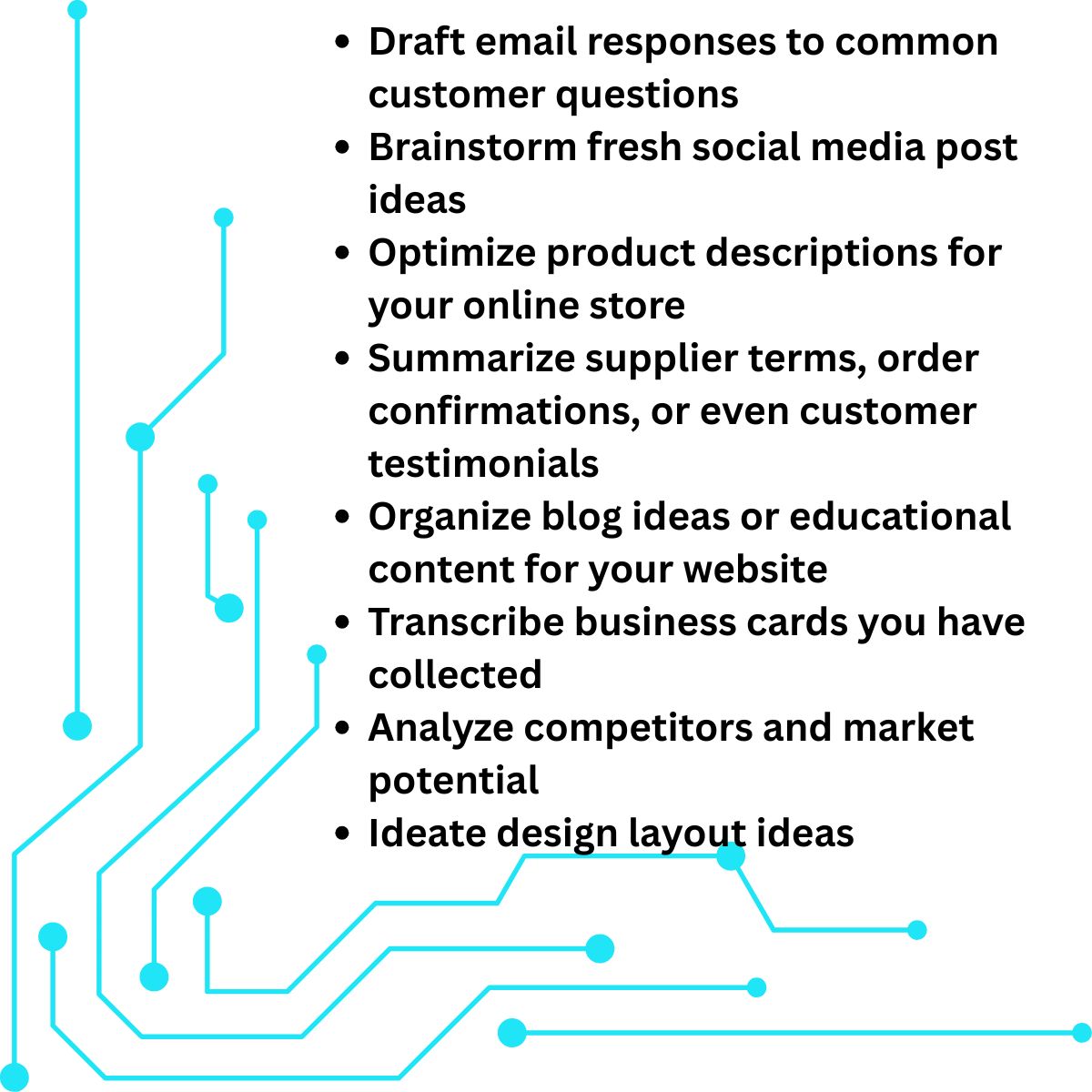
While this doesn’t even scratch the surface, there are limitations. Think of it as your super-fast, but sometimes clueless, intern. You have to remember what business you’re in. You’re not selling ink on shirts. You’re solving problems, telling stories, and helping people express themselves. That’s where your value comes from. AI just helps you tell that story faster.
The key is guiding it correctly. If you’ve ever asked ChatGPT a vague question and gotten a bland, generic answer, you know what I mean. The magic happens when you learn how to talk to AI in a way that gets you what you want.
Introducing the CARE Model
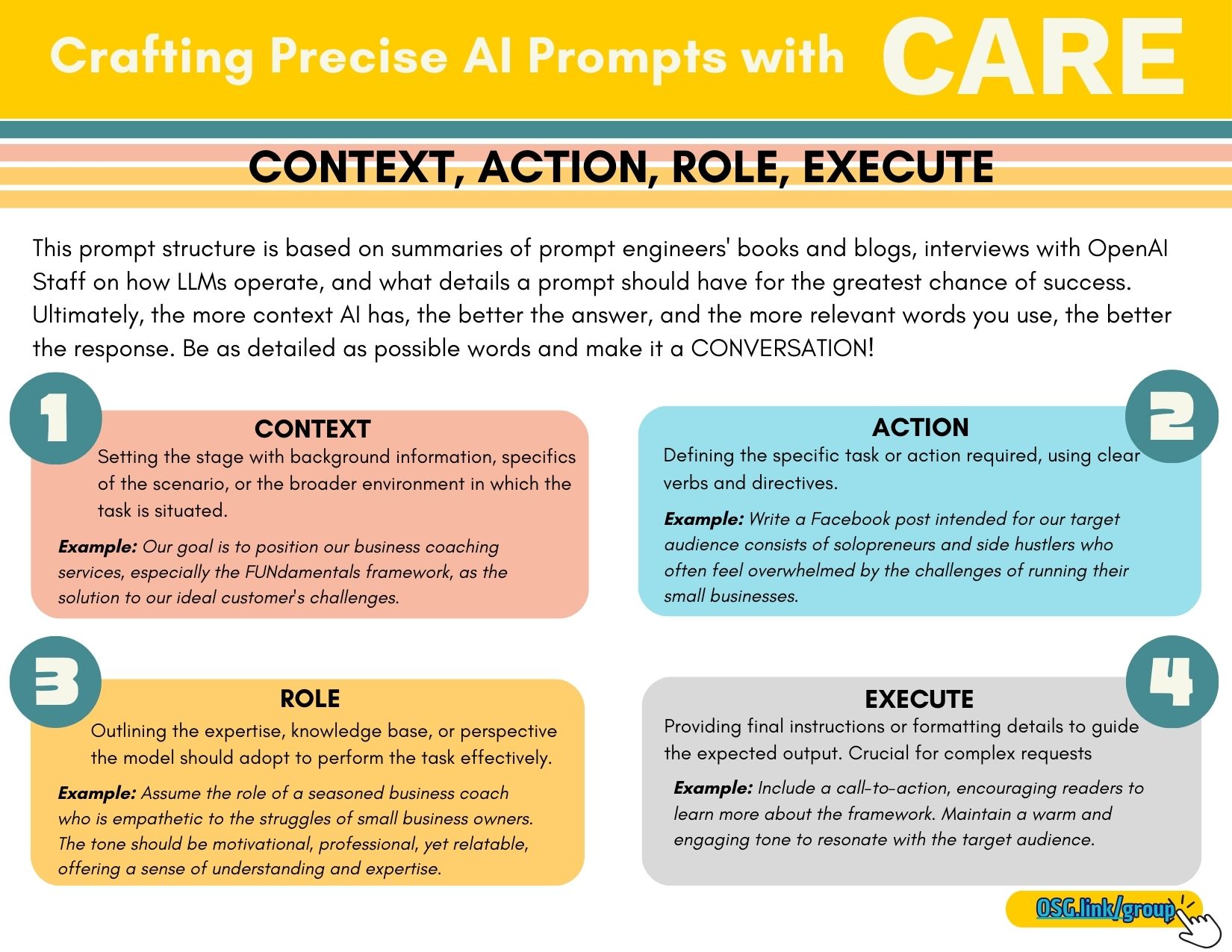
I created the CARE model to give small business owners a simple, repeatable way to get high-quality results from AI. Here’s how it breaks down:
C – Context (Set the Stage)
AI is smart, but it’s not psychic. The more relevant information you give it, the better your results. Context means telling the AI who you are, who your customers are, and what you’re trying to accomplish. For example:
You are a local screen-printing business aiming to attract new customers by increasing engagement on Facebook. Your target audience includes local organizations (schools, sports teams, small businesses, community groups) who need custom screen-printed apparel. The goal is to showcase your expertise and personality in a way that builds connection and encourages them to choose you for their next order.
That’s way better than just saying, “Write a social media post as a screen printer.”

A – Action (Define the Task)
Be crystal clear about what you want AI to do. Are you asking it to write a product description? Draft a reply to a customer inquiry? Brainstorm headlines for a promo email? And even go beyond this level of detail. Write a description for your products that will be purchased by business owners for branding purposes on your Shopify e-commerce site. Then use the following example for a social media post:
Write a Facebook post that speaks directly to these potential customers, highlighting common apparel needs, the value of working with a local, trusted printer, and what makes your shop the right choice. The post should be fun, relatable, and feel current with what’s trending on social media.
R – Role (Set the Perspective)
Tell AI who it should “be” while doing the task. Should it write like a marketing expert? A helpful customer service rep? A fellow screen printer sharing tips? Even give it deep detail about who you are and how you write. I asked my AI to take in a bunch of my native writing and then review it for what my tone is. We came up with: engaging and approachable, blending expert guidance with humor and relatability. Now that detail goes into each prompt I write as a part of the role I want it to take on for me. And example for you might be:
Take on the role of a friendly, approachable screen-printing pro who’s in-the-know with local events and understands what customers want from their apparel. Your tone should be casual, fun, and community-focused — not too salesy, more like a trusted neighbor who happens to make awesome shirts.
This helps AI match your tone and keeps your brand’s personality in the content.
E – Execute (Fine-Tune the Output)
Here’s where you dial in the final details. Do you want bullet points or a paragraph? Should it be short and punchy, or more detailed? Need a call-to-action at the end? For example:
End the post with a clear call-to-action, encouraging readers to call your office at 555-555-5555 to discuss their apparel needs. The post should be engaging, scroll-stopping, and encourage interaction (likes, comments, shares).
This step ensures the AI’s work is polished and usable right out of the gate. Then based on this format you can write a very detailed prompt as in the examples above. Keep in mind more simplified prompts based on this format are going to give you significantly improved results:
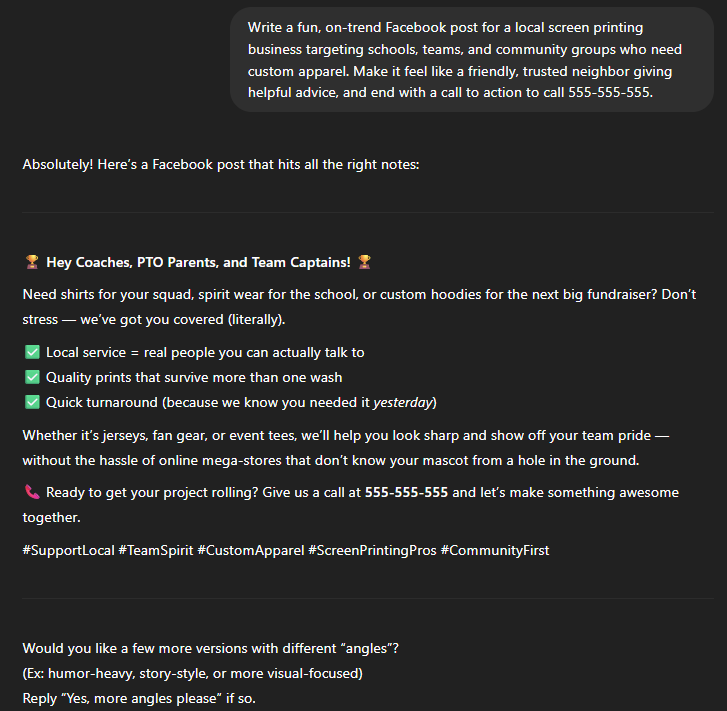
Write a fun, on-trend Facebook post for a local screen-printing business targeting schools, teams, and community groups who need custom apparel. Make it feel like a friendly, trusted neighbor giving helpful advice, and end with a call to action to call 555-555-5555.

AI versus the Human Touch
Even with the CARE model and a lot of training, I still feel like we can spot AI-only writing pretty easily. I always recommend editing, changing, and rewriting before sharing it as your own. AI is a great tool, but it can sound robotic if you’re not careful. Add your personal touch, and make sure it sounds like you.
Another common trap with AI is relying on it too much. It feels and acts really smart, but when it comes to your business, it can’t replicate your knowledge and insight.
AI is fantastic for drafts, ideas, and repetitive tasks. But when it comes to strategy, customer relationships, and creative direction, that’s your job. Think of AI as the assistant who gets you 80% there but remember you are still the one making the calls.
If you’ve been curious but hesitant, my advice is simple: Start small. Use it to help draft an email or a product description. Guide it well, tweak the results, and you’ll quickly see how much time you can save. You’ll also see how important it is to stay involved in the process, keeping your unique voice front and center. The more you input, the better the results.
AI can’t replace the relationships you’ve built or the craftsmanship you bring to every order. But it can clear the clutter, so you can do more of what makes your business great. By using the CARE model to guide AI, you can streamline the busywork, create better content faster, and keep your brand’s human touch alive and well.