
Un-Bulletproof Your Apparel Prints
Creating high-quality, comfortable prints that don’t feel heavy or have distorted designs starts before you even go to production
If you have seen “Fistfull of Dollars,” one of the most popular spaghetti westerns from back in the ‘60s, Clint Eastwood famously wore a metal plate under his brown poncho to block the villain's rifle bullets until he could get close enough to use his revolver. As entertaining (and a bit cheesy) as this movie is, I’m guessing the metal plate was no picnic to wear under that poncho, especially in the heat.
The issue of a print feeling like a “bulletproof” plate is a common challenge in both screen printing and direct-to-film (DTF) prints. If too much of the surface area of the garment is covered with a heavy layer of ink, the garment can become uncomfortable to wear because air cannot easily penetrate the printed area — it can be hot and even stick to the skin.
Other issues with heavy prints on garments like this are that they typically don’t stretch like the surrounding garment, so they are less able to adapt to people’s bodies (Figure 1).
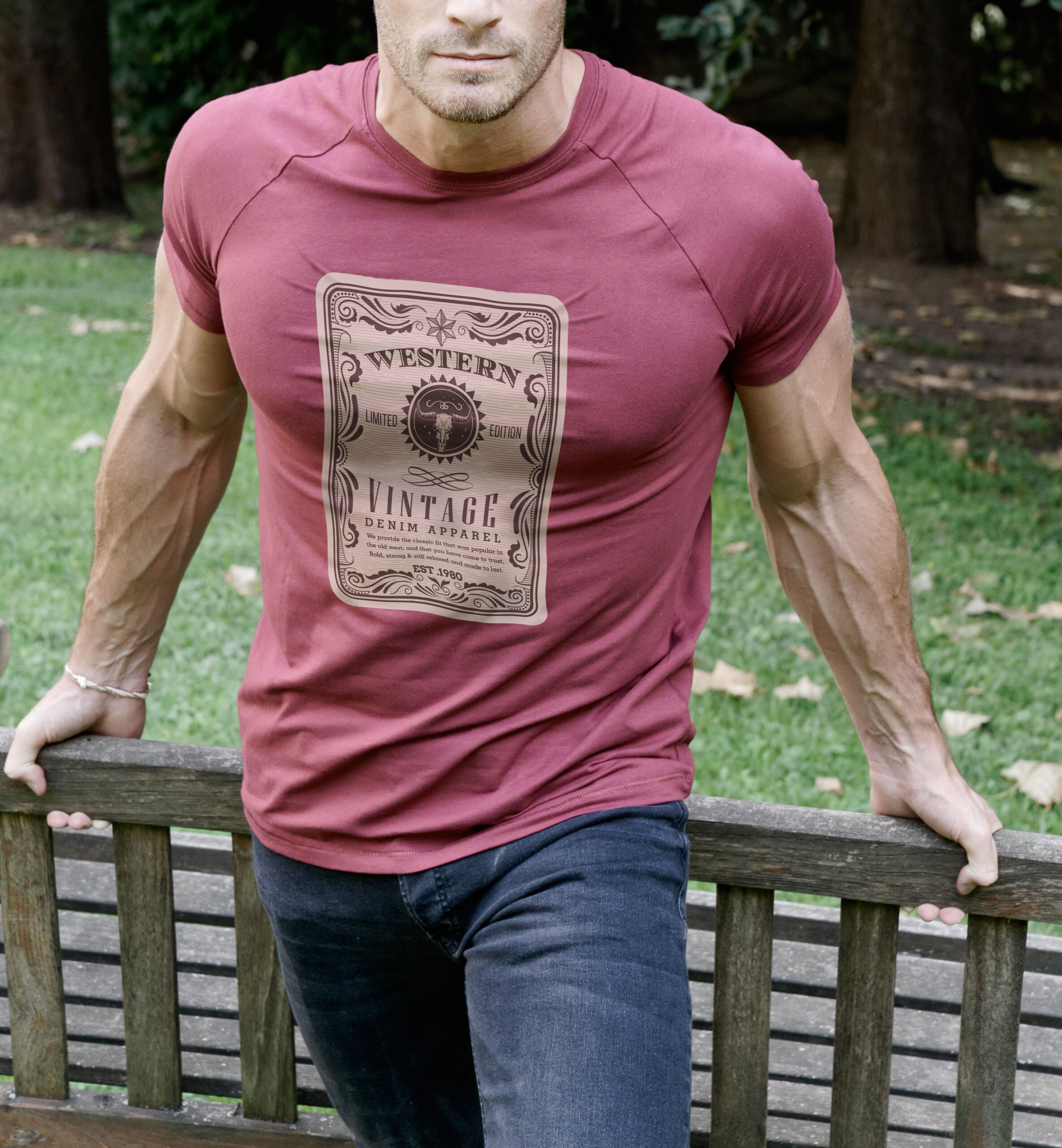
Another common complaint about big, solid printed areas is that they feel heavy to the touch, especially in comparison to many of the lighter fabric garments that are in fashion today. The lighter weight a garment is, the more important it is to consider the print feel and coverage of the graphic. It’s likely the garment was chosen because of its light and breezy feel, and a heavy print with a lot of coverage becomes uncomfortable due to the dramatic difference between the unprinted and printed fabric.
Fortunately, with a little foresight, creating prints that are less “bulletproof” isn’t a hard challenge. With a couple properly applied steps and a little testing, you can deliver a more appealing finished product.
When presented with a request that you know will create a bulletproof chest plate, do the following steps:
- Have an art review meeting to address the issue with the customer
- With the client's approval, look at ways to modify the design for a lighter feel
- Test your modification processes to define some solution standards
Catching Those Bulletproof Prints Early
Detecting that a print may wind up too heavy before you actually move into production is a critical step in the process. For most customer-submitted graphics, there are a few standard guidelines that help dictate what to watch for. But even before you look at these, make sure you have all order details clarified so that you know the media and printing style variables that can also influence the final outcome:
- Understand what color or colors of garments are needed so you have an idea of whether the design will need an underbase.
- Determine the blank brand type(s) requested and what fabric styles are involved so you can plan for those.
- Clarify if the print will need to be one size or different sizes to accommodate different size garments (this is especially important for adult to youth sizing — a distress pattern that works for an adult print may not reduce in size to perform the same for a kid size because the pieces or lines become too small).
- Review any unique printing needs of the order such as specialty ink requests (things like puff ink, HD ink, glitter, and some adhesives will affect the weight of the final print).
These order-related points are important and can contribute to the graphic variables that also affect the actual weight and feel of the final printed product.
Reviewing the graphic elements in a submitted file, it is useful to have a short checklist that will allow you to catch a heavy print during the early stages. This makes it easier to re-engage with your customer and suggest some strategies to address the challenges. Some red flags that indicate a print may be uncomfortable after printing are (Figure 2):
- If the graphic is a large, unbroken square (or other large shape) covering the majority of the available printable area on the garment.
- When the design includes large areas with bright primary colors that will require a solid underbase under them (such as bright red, yellow, or royal blue).
- An image that has large, flat solid white areas on a darker garment.
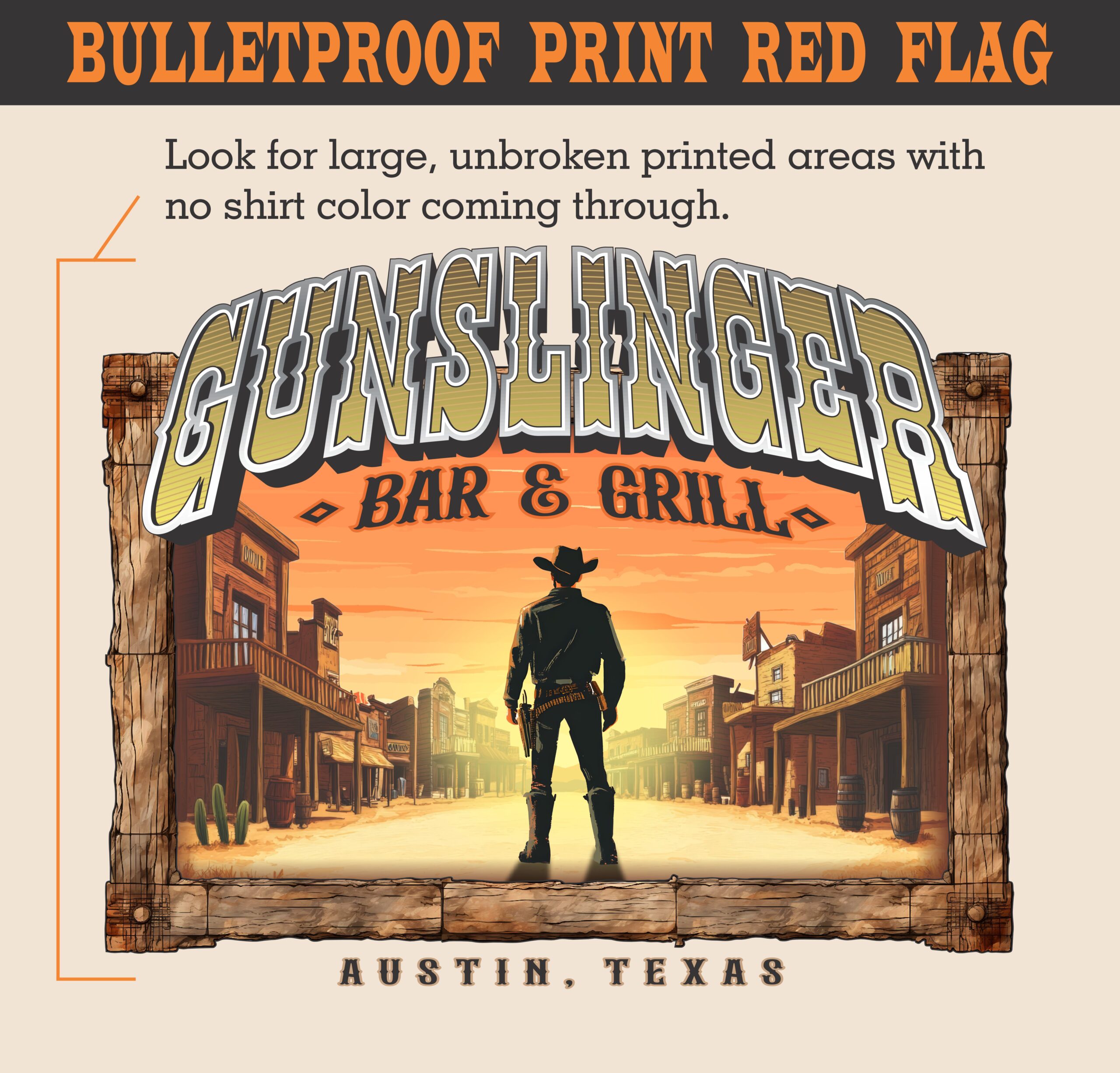
Once you identify signs that the requested print will produce an uncomfortable finished product, address it with your customer. A positive way to address this is with subtle suggestions instead of critiques. Try opening the discussion with, “After reviewing your graphic and the requested garments, we talked with our art team and have a couple suggestions that we recommend to give you the best possible finished product.”
In some cases, the client may decline the suggestions and insist on the heavier print. That is their choice, but at least you made the effort and to some degree you are less implicated if the product isn’t received well by the end-user.
If they decide to take your suggestions, move forward and offer a couple of simple adjustments (depending on what best fits the graphic, the garment, and the printing styles) that can help make the printed product more comfortable.
Modifying a Design to be Less Heavy
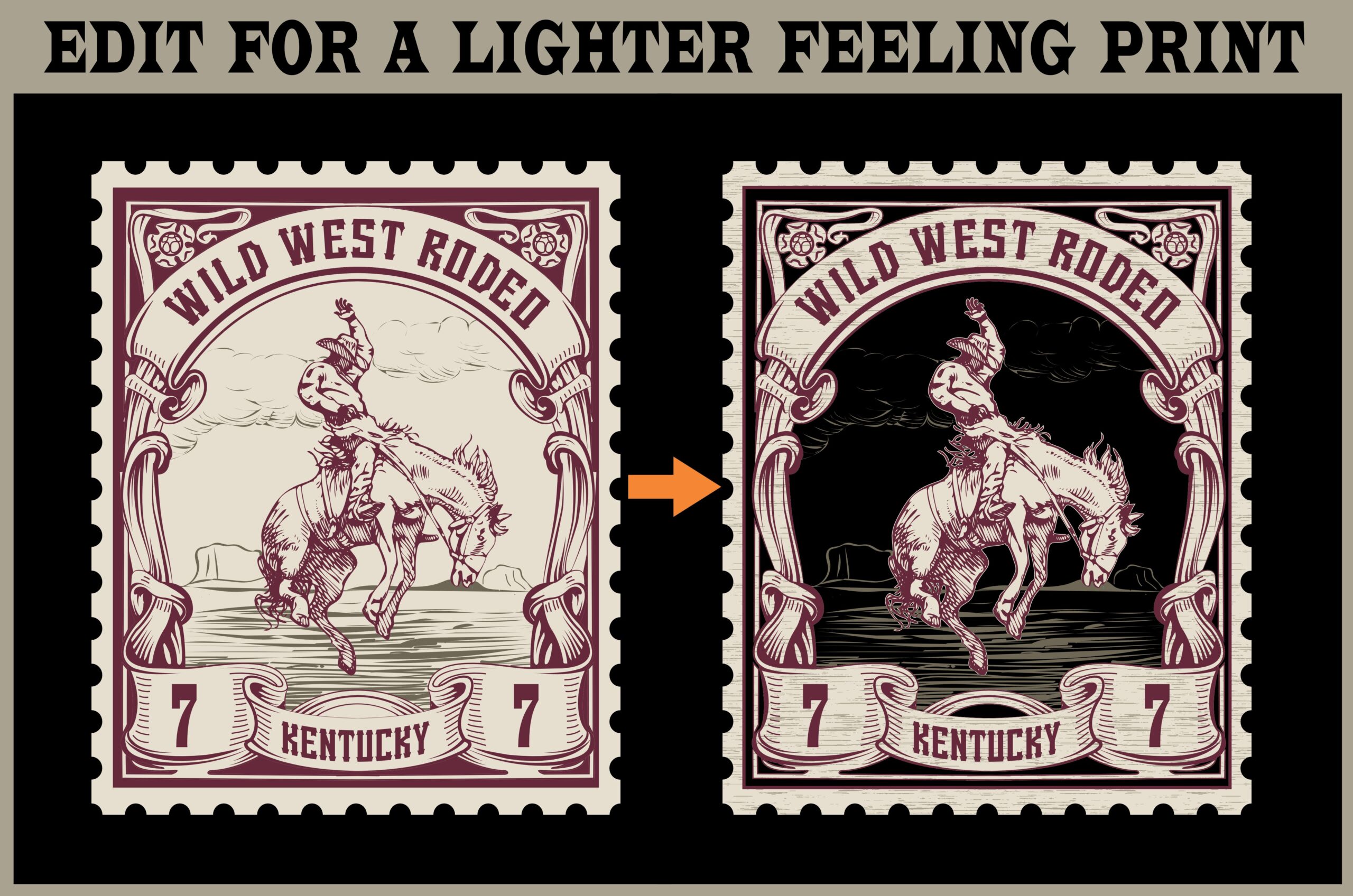
The biggest single factor that can improve the weight and feel of a printed image is to create gaps in the design that allow the shirt fabric to come through. It is useful to consider both the color of the to-be-printed product and the image to see if there is an opportunity to utilize the shirt color in the printed image.
In some cases, it is relatively easy to integrate the shirt color in a design. Darker shirt colors tend to be good for this approach. The key is to test and try to maintain the original concept as much as possible while creating areas that the wearer’s skin can breathe through (Figure 3).
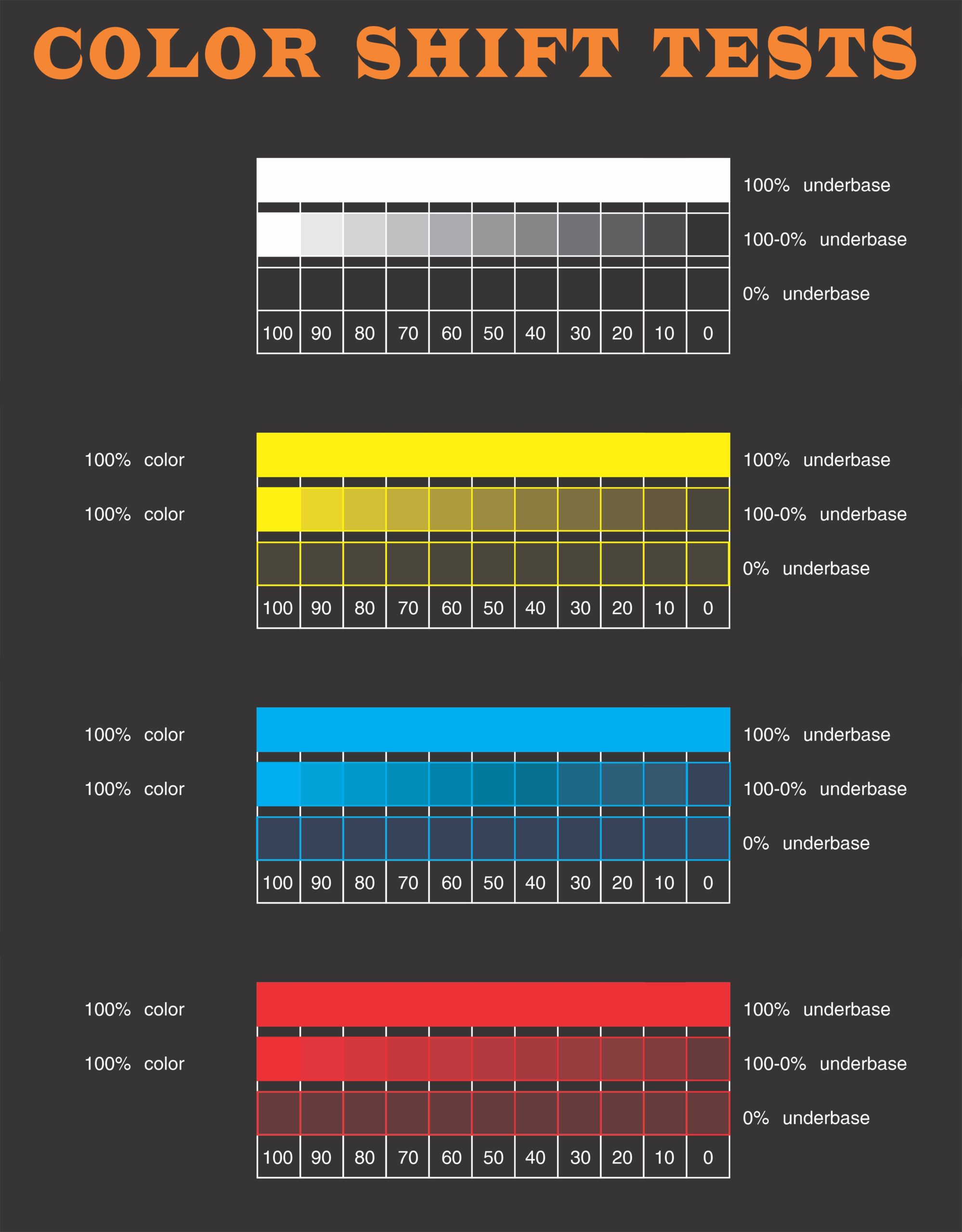
Another method to consider is whether the design will be screen printed. If there are a lot of color modulations as well as darker areas in the graphic, see if you can create a much lighter underbase for the design so the feel of the print is composed of far less ink. If you compare a solid underbase with an edited one, the difference in ink load is considerable, particularly if you remove all underbase under solid blacks or very dark tones (Figure 4).
This is possible in screen printing as the colors are printed thicker and more opaque than in digital printing, and they often still reflect their hue without the underbase being present. The best way to evaluate this is if you have previously tested your inks and know the level of underbase they start to lose vibrancy. Although it is extra work to do this type of testing, it can be easy to do. Once you have a printed reference of your typical inks, you don’t need to repeat it until you change your ink set or their base opacity (Figure 4).
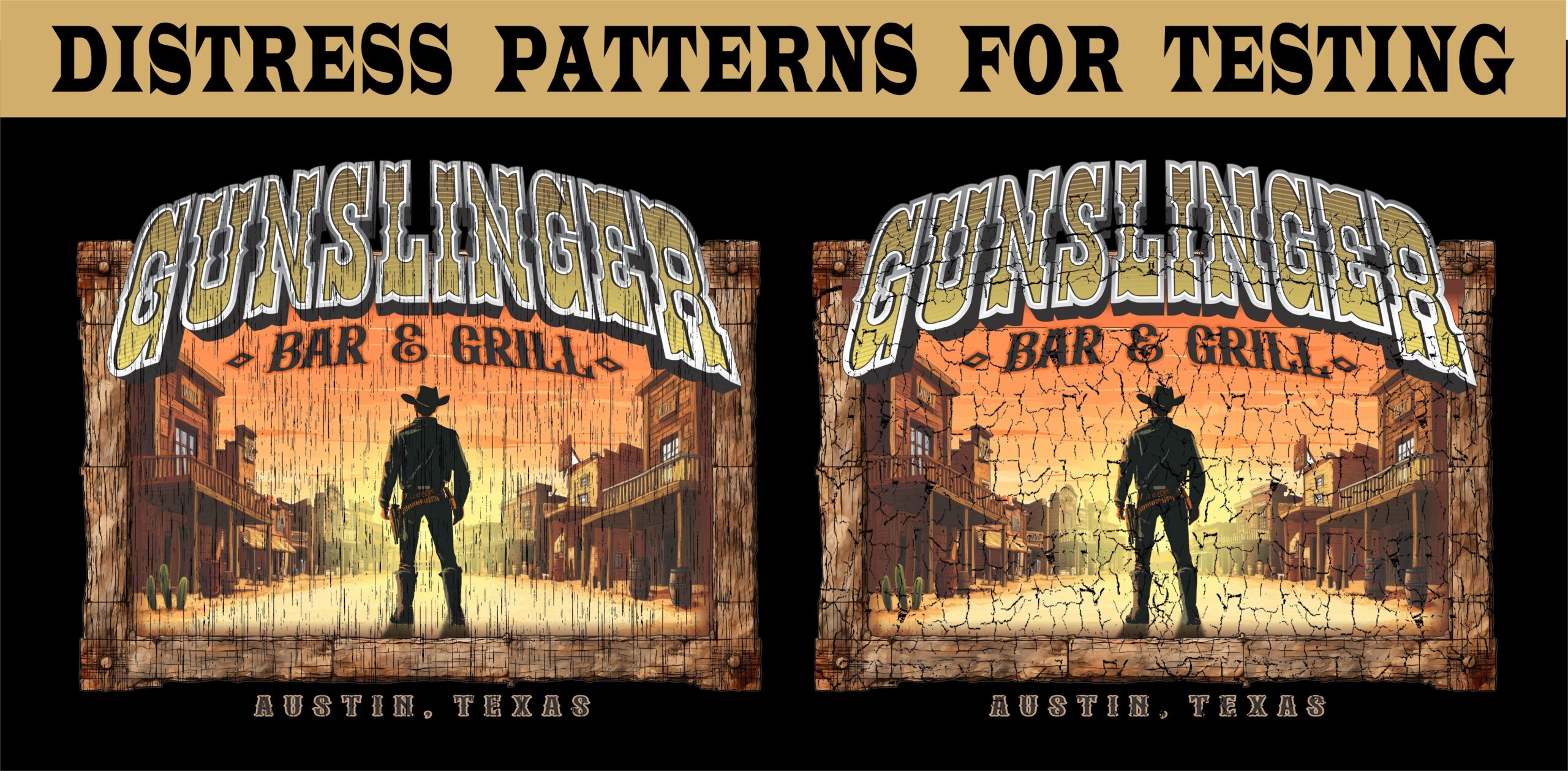
With digital printing, changing the underbase opacity may not be an option due to the transparency of the colored inks and the lighter ink laydown. A final concept to test in this case is to see if an overlay filter (sometimes called a “distress filter”) works on parts or all of the design.
Using this type of solution can be a bit tricky on a digital print — you have to be careful and make sure the underbase will not show or it may look poorly printed. It’s also important to wash test the final result to make sure the added edge surface area doesn’t impact the durability (Figure 5).
Test these patterns on small sections of a final print, and test different sizes and types of distress applications so you don’t have to print entire graphics — you can test many variations at once. Testing of this sort on a digital print is simple, and once you have several reliable distress or pattern overlays that perform well in tests, they can greatly improve the feel of the print when it is worn.
A similar version of this that can improve a digital print’s look and feel, especially those that are transferred like DTF, is to do this type of test with different faded patterns that break up the edges of a print. This edge effect is most commonly used for darker garments to create a blended effect and make the print and garment presentation more unified.
Finding the right pattern for this effect that consistently performs well in printing and transferring application is critical so that you don’t have issues during tight production schedules. The pattern pieces will likely need to be of a certain size and/or shape to hold an overprint and then transfer and wash well, so good testing is essential.
Once the right solution is determined, though, it will dramatically improve the feel of the print, as well as make it look more like a direct print instead of a less expensive transfer.
Side Notes for Screen Printers: When image modification isn’t an option, one solution on all-cotton garments or cotton-blended fabrics (particularly ones that are discharge friendly) that can significantly lighten the feel of prints with large coverage areas is to use waterbase inks instead of plastisol (and discharge waterbase inks on dark cotton garments). This is best covered in another article as it has many other variables, and for the purposes discussed here we assume it isn’t an option. Before this can be considered, a printer has to have the components, experience, and dryer that can properly manage waterbase inks.
There are some ink additives and different bases that can be used with plastisol inks that can lighten their printed feel on a garment. Care must be taken with these as they can affect look, color, and final durability of the print, but in certain cases, they can produce a similar effect to waterbase ink. Check with your ink supplier if you would like to test some of these.
A Final Note on Testing
Some printers don’t take the time to thoroughly test a modification process before putting it into production. This is understandable, as there is little time to spare, and testing takes people, supplies, and equipment away from making profits.
The reason to test design modifications like those suggested in this article is to establish your operation at a higher level of quality in image replication, application, and durability. Once you have set new standards, you can apply them across the company for all future orders that may have similar issues and you won’t have to guess or worry about the best methods of addressing them.
Testing these processes doesn’t need to be a massive undertaking. You only need a small section of a print per variable or solution, and you can test many different variables in one full-size print. A good way to test is to label the artwork with a pattern or solution number, then print this number around the specific testing region. This allows you to track each separate solution at each stage of the process and watch for issues:
- Does the print maintain image integrity through the distress pattern? (Or does text maintain its legibility?)
- Is the underbase visible through the edges of a distress or edge/fade pattern? (Does it require some trappling or larger pieces?)
- Does the effect screen print well without distortion or bleeding? (Some horizontal line patterns or halftones can be problematic for screen printing as the screen stencil with these lines can catch the edge of a squeegee and cause bleeding, for instance.)
- Does the effect digitally print well and transfer without distortion or transferring/peeling issues? (Some patterns with jagged edges, small pieces, thin lines, or shapes with pointed elements may not release well from the transfer media during the peeling process.)

Establishing several, fully tested solutions for improving the breathability and wearability of your screen and digital prints will provide long-term benefits in both customer loyalty and satisfaction for as long as they wear your (more comfortable) printed garments. If you take the time and carefully review prints that may be bulletproof with your clients, suggest and implement solutions, and properly test and establish standards that will easily replicate, you can address this concern before production and offer higher quality than your competition.